
 Docs
Expo Updates without EAS
Keep expo-updates in your Expo app and serve over-the-air updates from FireOTA instead of EAS Update. Bundles stay in your own Firebase Storage, with channels, rollouts and rollbacks included.
15 sections Edit this page on GitHub
How it worksNew
expo-updates is Expo's open-source update client. It asks a server for a manifest (which bundle to run) and then downloads the files. EAS Update is Expo's paid server for this. FireOTA speaks the same Expo Updates protocol, so you can swap the server by changing one URL.
Your Expo app
expo-updates checks on launch
FireOTA
picks the update for the channel, runtime and rollout
Your Firebase Storage
serves the bundle and assets
- On every launch,
expo-updatessends its platform, runtime version, channel and the ID of the update it runs. - FireOTA picks the newest published update for that channel and runtime, and applies your rollout percentage.
- The app downloads the files in the background, checks every file's SHA-256 hash, and switches to the new bundle on the next launch.
- Installs show up in Analytics as soon as a device starts running the update.
expo-updates or the FireOTA SDK?New
Both work in Expo apps. Pick one per app, because they can't both run in the same app.
| expo-updates + FireOTA (this page) vs FireOTA SDK | |
|---|---|
| Native change | None, if expo-updates is already installed. The SDK adds a config plugin. |
| Update UI | Silent: the update applies on the next launch, or you build your own UI with useUpdates(). The SDK includes ready-made prompts and screens. |
| Mandatory updates | Not shown to users automatically. With the SDK, a mandatory update blocks the app until it's installed. |
| Code signing | Not yet. The SDK supports signed updates. |
| Best for | Moving off EAS Update with no code changes. The SDK suits new apps and full control. |
Choosing the SDK? Follow the Expo guide instead.
Requirements
- Expo SDK 50 or newer with
expo-updatesinstalled, in a development or release build. Expo Go always loads from the dev server. - A FireOTA workspace with Firebase connected and the app registered. See Create a workspace and connect Firebase and Register your app.
- An API key that can publish releases, for the CLI (Settings → API keys).
- Tested on a real Android phone with Expo SDK 58 (React Native 0.88). iOS uses the same protocol.
1. Install the packages
Add expo-updates to the app (skip this if it's already there) and the FireOTA CLI as a dev dependency:
npx expo install expo-updates
npm install -D @fireota/cli
Copy the App ID from the app's page in the dashboard. Every command and URL below uses it.
FireOTA test
runtime 1.0.0 · Android, iOS
2. Point expo-updates at FireOTA
In app.json (or app.config.ts), set updates.url to your app's manifest URL and choose a channel. If eas update:configure added a u.expo.dev URL, replace it.
{
  "expo": {
    "version": "1.4.0",
    "runtimeVersion": { "policy": "appVersion" },
    "updates": {
      "url": "https://fireota.creoai.in/api/public/v1/expo/<appId>/manifest",
      "requestHeaders": { "expo-channel-name": "production" },
      "checkAutomatically": "ON_LOAD",
      "fallbackToCacheTimeout": 0
    }
  }
}| Field | What it does |
|---|---|
updates.url | Where the app checks for updates: <FIREOTA_URL>/api/public/v1/expo/<appId>/manifest. |
expo-channel-name | The FireOTA channel this build listens to, for example production, beta or development. Use a different value per build profile. |
runtimeVersion | A fixed string ("1.4.0") or { "policy": "appVersion" }. Updates only go to builds with the same runtime. The fingerprint policy isn't supported by the CLI yet. |
checkAutomatically | ON_LOAD checks on every cold start. Use NEVER if you only want to check from code. |
fallbackToCacheTimeout | 0 starts the app immediately and applies the update on the next launch. A higher value (ms) waits for the download first. |
app.config.ts to pick the channel from an environment variable, so your preview and production builds listen to different channels.3. Make a store build
The update URL and channel are built into the native app, so make one new build and ship it (Play Store, App Store, TestFlight or an internal APK). From then on, JavaScript-only changes go out as updates.
# Local release build
npx expo run:android --variant release
npx expo run:ios --configuration Release

# …or EAS Build (only the build runs on EAS; updates come from FireOTA)
eas build --platform all
Freshly installed, the app runs the bundle built into it:
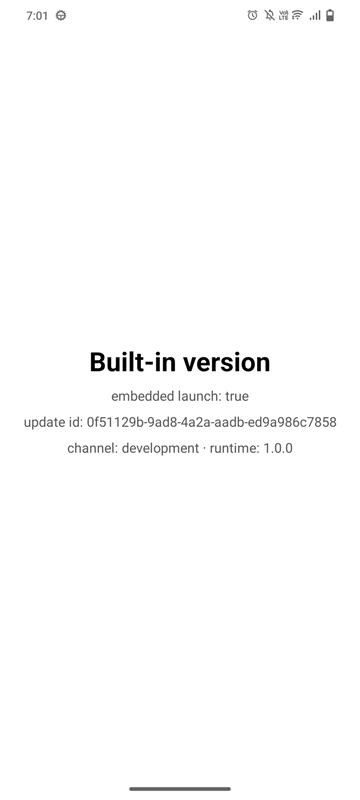
isEmbeddedLaunch is true.4. Publish an update
Set your credentials once (locally or as CI secrets):
# .env or CI secrets
FIREOTA_URL=https://fireota.creoai.in
FIREOTA_API_KEY=fota_sk_live_...
FIREOTA_APP_ID=<appId>
Then publish with --expo. The CLI runs expo export, reads the runtime version from your app config, uploads the bundle and every asset to your Firebase Storage, checks the upload, and publishes to the channel:
export FIREOTA_API_KEY=fota_sk_live_...
npx fireota publish --expo --app <appId> --platform android --channel production --message "Fix checkout"
$ npx fireota publish --expo --app 83822cef-… --platform android --channel development --message "OTA update from FireOTA"Exporting android update with expo export…› android bundles (1):_expo/static/js/android/index-c9501d24….hbc (1.6MB)Update #2 (7f4cde6f-6ac2-414c-a369-0bb7f65a4912) — draft [android, local]Uploading bundle + 0 assets…✓ Verified in your Firebase Storage. SHA-256 7cd72657…✓ Published update #2 (android) at 100%.– expo-updates URL for app.json:– https://fireota.creoai.in/api/public/v1/expo/83822cef-…/manifest
More examples:
# Both platforms as one update group, to 10% of the beta channel
npx fireota publish --expo --platform all --channel beta --rollout 10 --message "New onboarding"

# Force a runtime version instead of reading app.json
npx fireota publish --expo --platform ios --runtime 1.4.0 --message "Hotfix"

# Machine-readable output for CI
npx fireota publish --expo --platform android --channel production --message "CI build" --json
| Flag | Meaning |
|---|---|
--expo | Build with expo export, for apps that use expo-updates. |
--app | App ID. Defaults to FIREOTA_APP_ID. |
--platform | android, ios or all (one update group for both). |
--channel | Must match the expo-channel-name in the build. |
--rollout | Percentage of devices to receive the update (default 100). |
--runtime | Overrides the runtime version from app.json. |
--message | Release notes shown in the dashboard. |
--json | Prints a JSON result for CI. |
--file and --private-key can't be combined with --expo. If the app requires signed updates, the upload is rejected with SIGNATURE_REQUIRED.5. Check it on a device
Open the app, close it fully, and open it again. The first launch downloads the update in the background, and the second launch runs it. These screenshots are from a real Android phone:
embedded launch: true).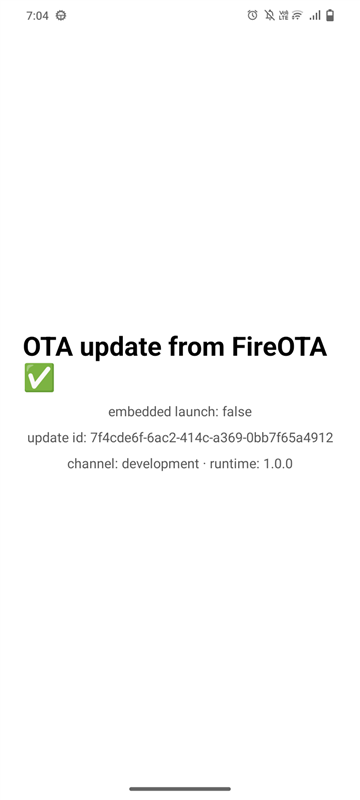
embedded launch: false), and its update ID matches the release.Show the same details in your own app while you test:
import * as Updates from "expo-updates";
import { Text, View } from "react-native";

export function UpdateInfo() {
  return (
    <View>
      <Text>Built-in bundle: {String(Updates.isEmbeddedLaunch)}</Text>
      <Text>Update ID: {Updates.updateId ?? "none"}</Text>
      <Text>Channel: {Updates.channel} · runtime {Updates.runtimeVersion}</Text>
    </View>
  );
}
To check and apply an update straight away (from a button, for example) instead of waiting for a restart:
import * as Updates from "expo-updates";

export async function checkNow() {
  const check = await Updates.checkForUpdateAsync();
  if (!check.isAvailable) return;
  await Updates.fetchUpdateAsync();
  await Updates.reloadAsync(); // restart into the new bundle now
}
In the dashboard, the release records an install once the device starts running it.
Channels, rollouts and rollback
Expo updates use the same release controls as SDK updates. Everything on Rollouts, pause and rollback applies:
- Staged rollout: publish with
--rollout 10, then raise the percentage from the dashboard. Each device stays in the same bucket. - Pause: stops new downloads. Devices that already have the update keep it.
- Roll back: devices move to the previous update on their next launch. With no earlier update, FireOTA tells them to go back to the bundle built into the app (
rollBackToEmbedded). - Archive and delete: remove old updates from the Releases list. See Archive and delete releases.
Runtime versions
An update only goes to builds with exactly the same runtime version. Change it every time native code changes (new native package, Expo SDK upgrade, permissions or config plugins), then make a new store build.
"runtimeVersion": "1.4.0": you control it by hand.{ "policy": "appVersion" }: followsexpo.version. The CLI reads it automatically.- Per-platform values (
android.runtimeVersion/ios.runtimeVersion) take priority over the top-level value.
See Runtime versions for how FireOTA matches them.
Storage and security
- Your bucket, your data. Bundles and assets are uploaded to the Firebase Storage bucket you connected. FireOTA stores only the release details and file paths.
- Integrity. The manifest has a SHA-256 hash for the bundle and every asset.
expo-updatesrejects any file that doesn't match. - Upload check. The CLI sends the bundle's hash, and FireOTA checks it against the stored file before it can be published.
- HTTPS. Use an
https://URL in production. Plainhttp://only works if you allow cleartext traffic, which is meant for local testing. - API keys are only needed to publish. Devices call the manifest URL without a key, and the endpoint is rate limited.
- Code signing for Expo updates is not available yet. Use the FireOTA SDK if you need signed updates.
What FireOTA sends (protocol details)
Useful for debugging. Ask for the manifest exactly as the app does:
curl -i "https://fireota.creoai.in/api/public/v1/expo/<appId>/manifest" \
  -H "expo-platform: android" \
  -H "expo-runtime-version: 1.4.0" \
  -H "expo-channel-name: production" \
  -H "expo-protocol-version: 1"
HTTP/1.1 200 OK
content-type: multipart/mixed; boundary=…
expo-protocol-version: 1
expo-sfv-version: 0

--…
content-disposition: form-data; name="manifest"
content-type: application/json

{
  "id": "7f4cde6f-6ac2-414c-a369-0bb7f65a4912",
  "runtimeVersion": "1.4.0",
  "launchAsset": { "key": "bundle-…", "hash": "<sha256, base64url>", "url": "https://firebasestorage.googleapis.com/…" },
  "assets": [ … ],
  "extra": { "fireota": { "releaseId": "7f4cde6f-…" } }
}
--…
content-disposition: form-data; name="extensions"

{ "assetRequestHeaders": {} }| Request header | Used for |
|---|---|
expo-platform | android or ios. |
expo-runtime-version | Only updates with this runtime are considered. |
expo-channel-name | Which FireOTA channel to serve. |
expo-current-update-id | Records the install once the device runs a FireOTA update. |
expo-embedded-update-id | Tells the built-in bundle apart from a downloaded update. |
eas-client-id | A stable device ID, used for rollout buckets and analytics. |
With no update to serve, FireOTA returns a noUpdateAvailable directive, or rollBackToEmbedded when the device runs an update that has since been rolled back. Old clients on protocol 0 get a plain JSON manifest, or204 No Content when there's nothing new.
Testing against a local server
When you run FireOTA locally (npm run dev on port 3000), point a test build at it and forward the port to an Android phone with adb reverse tcp:3000 tcp:3000. Android blocks plain HTTP by default, so allow it in the test build only:
{
  "expo": {
    "updates": { "url": "http://localhost:3000/api/public/v1/expo/<appId>/manifest" },
    "plugins": [["expo-build-properties", { "android": { "usesCleartextTraffic": true } }]]
  }
}Troubleshooting
- The app still shows the old version: updates apply on the next launch. Close the app fully and open it again, or call
Updates.reloadAsync(). noUpdateAvailablefrom the curl check: check that the channel, platform and runtime version match apublishedupdate, and that its rollout includes the device.- Works in the emulator but not on the phone: the phone can't reach the URL. Use HTTPS in production. For a local server, run
adb reverseagain after reconnecting the phone. - Download fails on some networks: some networks block Firebase Storage or break HTTPS. Try another Wi-Fi network or mobile data.
- Firebase returns 402: billing is disabled on the Firebase project, so Storage downloads stop. Turn billing back on in Google Cloud.
- “Could not resolve the runtime version”: set
runtimeVersionto a string or theappVersionpolicy, or pass--runtime. SIGNATURE_REQUIRED: the app requires signed updates, and Expo updates can't be signed yet. Turn that setting off for this app, or use the SDK.- Running in Expo Go: Expo Go always loads from your dev server. Test with a release build.
FAQ
| Question | Answer |
|---|---|
| Do I still need an Expo account? | Only if you use EAS Build. Updates no longer go through EAS. |
| Can I keep EAS Build? | Yes. Builds can stay on EAS; only the update server changes. |
| What happens to users on an old build? | They keep checking the old updates.url until they install the new build. |
| Does it cost anything? | You pay Firebase for storage and downloads in your own project. There's no per-update fee from FireOTA. |
| Web support? | No. expo-updates only updates Android and iOS apps. |
Was this page helpful?